![Invelo square logo-1.png]](https://helpdesk.inveloapp.com/hs-fs/hubfs/Invelo%20square%20logo-1.png?height=40&name=Invelo%20square%20logo-1.png)
Invelo allows you to fully customize your Lead Intake Form so it fits your acquisition strategy and conversation flow. Whether you want to update question wording, change field types, or reorganize the form, editing the Lead Intake Form ensures you’re collecting the most relevant information from your sellers.
This article walks you through the two ways to access the Lead Intake Form editor and explains the available customization options.
Ways to Access the Lead Intake Form Editor
You can edit your Lead Intake Form using either of the methods below.
Option 1: Edit from a Property Record
-
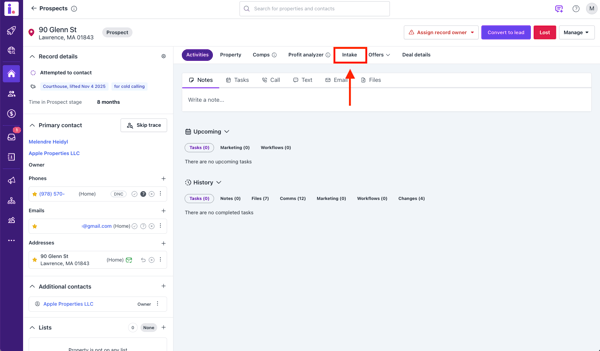
Open any Property Record
-
Select the Intake tab
-
Click Customize
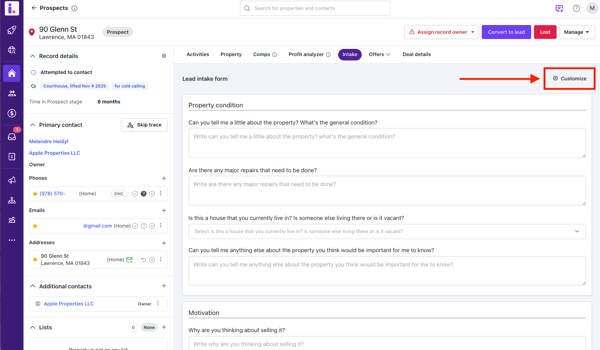
This option is useful if you’re reviewing a lead and realize a question or field needs to be adjusted.
Option 2: Edit from Settings
-
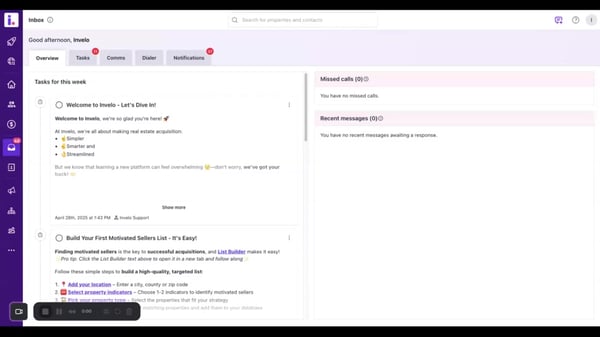
Go to Settings
-
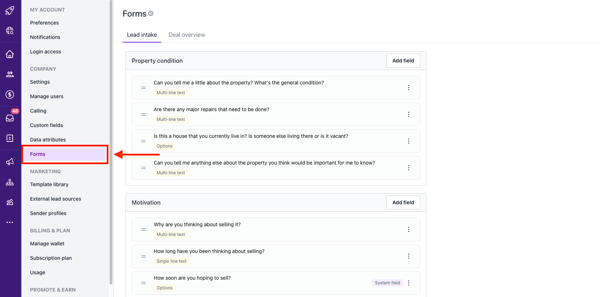
Select Forms
-
Click on Lead Intake
This method is ideal if you want to make broader updates before using the form for new leads.
What You Can Edit in the Lead Intake Form
Once you’re in the editor, you can customize the form in several ways:
Form Field Details
For each field, you can edit:
-
Form field name / question – The question shown to the seller or used during intake
-
Internal field name – Used internally for mapping and organization
-
Field type – Determines how the information is collected
Available Field Types
You can choose from the following field types:
-
Single line text
-
Multi-line text
-
Number
-
Date
-
Year
-
Currency (US)
-
Phone number
-
Options
-
URL
Managing Form Fields
-
Add Fields
Create new questions to capture additional seller or property details -
Edit Fields
Update existing questions, internal field names, or field types -
Delete Fields
Remove questions that are no longer relevant to your workflow
Rearranging Questions
You can change the order of the questions by dragging and dropping form fields. This allows you to match the natural flow of your seller conversations or prioritize the most important questions.
Best Practices
-
Keep questions clear and conversational
-
Align field types with the data you want to collect
-
Review internal field names carefully if you use integrations or automations
-
Reorder questions to match your call or follow-up process
Customizing your Lead Intake Form helps you collect cleaner data, qualify leads faster, and maintain consistency across your team.