![Invelo square logo-1.png]](https://helpdesk.inveloapp.com/hs-fs/hubfs/Invelo%20square%20logo-1.png?height=40&name=Invelo%20square%20logo-1.png)
The Inbox is your central hub for managing communication with your leads and prospects in Invelo. It brings your conversations from Gmail, phone calls, and SMS into one place, making it easier to stay organized, respond promptly, and keep conversations moving forward.
Whether you're following up with a potential seller, responding to an incoming call, or managing text conversations, the Inbox gives you one place to keep track of your communications and stay connected with your contacts.
Why inbox management is important
Effective inbox management helps you stay on top of conversations and ensures that important communications with your leads and prospects don't get overlooked.
With the Invelo Inbox, you can:
- Centralize your communications: Manage Gmail conversations, inbound and outbound phone calls, and SMS in one place.
- Stay organized: Keep track of your conversations with leads and prospects without switching between multiple platforms.
- Respond faster: Quickly review and respond to incoming messages and calls to keep conversations moving.
- Keep conversations in context: View your communication history with contacts so you can better understand previous interactions before following up.
- Streamline your outreach: Manage different communication channels from a single inbox for a more efficient workflow.
By keeping your communications organized in one place, the Inbox helps you maintain consistent follow-up and build stronger relationships with your leads and prospects.
How to access Inbox
- Log into your Invelo account.
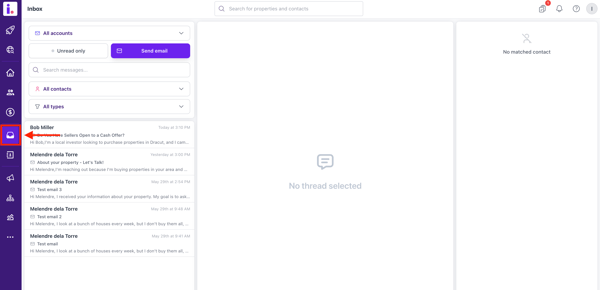
- Once you're in your Invelo account, click the Inbox button on the left-hand menu.
Using Inbox
- Connect Gmail
Connect your Gmail account to manage your email conversations directly within Invelo. This allows you to communicate with your leads and prospects without having to switch between Invelo and your email platform. - Manage Phone Calls
With the smrtPhone integration, you can manage your phone communications directly from the Inbox. This includes both inbound and outbound calls, allowing you to keep your phone conversations connected to your Invelo contacts. - Manage SMS Conversations
Your SMS conversations with leads and prospects are also available in the Inbox through the smrtPhone integration. You can review and respond to text messages while keeping your communication history organized in Invelo. - Keep Your Lead Communications Organized
The Invelo Inbox is designed to give you one streamlined place for your day-to-day communications with leads and prospects. By connecting Gmail and smrtPhone, you can manage email, phone calls, and SMS from a single location and spend less time switching between different communication tools.
Log in to Invelo and connect your communication channels to start managing your conversations more efficiently.
Next Steps
Take control of your communications today! Integrate your Gmail and connect smrtPhone to Invelo’s inbox to streamline conversations, automate follow-ups, and never miss an opportunity. Log into your account now and start managing your leads more efficiently!
In case you need any support with your Invelo inbox, you can definitely reach out to Invelo's support team by sending them a message through the in-app channel or email at support@inveloapp.com.