![Invelo square logo-1.png]](https://helpdesk.inveloapp.com/hs-fs/hubfs/Invelo%20square%20logo-1.png?height=40&name=Invelo%20square%20logo-1.png)
When you log in to your Invelo account, the Overview page is the first page you’ll see. It gives you a quick snapshot of the most important activity in your account, including tasks that need your attention, missed communications, and upcoming marketing batches.
Accessing the overview page
You can return to the Overview page at any time from anywhere in Invelo.
- Locate the Invelo icon at the top-left corner of the page. The icon is located inside the left-hand navigation menu, above the AutoPilot icon.
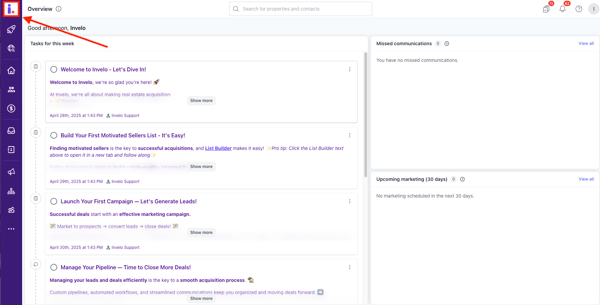
- Click the Invelo icon to open the Overview page.
What you’ll see on the overview page
The Overview page is organized into sections that help you stay on top of your daily activities.
-
Tasks for this week
The Tasks for This Week section gives you a quick view of the tasks you need to complete during the current week.
Use this section to keep track of your follow-ups and other activities so you can prioritize what needs your attention.
-
Missed communications
The Missed Communications section helps you identify communications that may need a response. It includes: Missed calls, Text messages, and Emails.
Reviewing this section regularly can help you avoid missing important conversations with your contacts and follow up promptly.
-
Upcoming marketing (30 Days)
The Upcoming marketing (30 Days) section provides a view of your marketing batches scheduled over the next 30 days.
This gives you a quick way to see what marketing activity is coming up and helps you stay aware of your scheduled campaigns and batches.
Make the overview page part of your workflow
The Overview page is designed to give you a convenient starting point whenever you log in to Invelo. Check your tasks, review any missed communications, and look ahead at your upcoming marketing activity to stay organized and keep your follow-ups on track.
Need support?
If you have questions about the Overview page or need help using Invelo, send us a message through the in-app chat or email us at support@inveloapp.com. Our team will be happy to help!