![Invelo square logo-1.png]](https://helpdesk.inveloapp.com/hs-fs/hubfs/Invelo%20square%20logo-1.png?height=40&name=Invelo%20square%20logo-1.png)
Invelo now gives you greater control over how you manage your data across the platform. With the new record selection functionality, you can choose a specific number of records from any table view—whether you're working in List Builder, Leads, Deals, or Communication Logs. This enhancement makes it easier to take action on a precise subset of your filtered results, improving efficiency and minimizing unnecessary bulk updates.
Previously, users were limited to selecting either all filtered records or manually checking individual entries. With this update, you can now decide exactly how many of your filtered records you want to include in your bulk actions.
Here’s how it works:
-
Apply Filters (Optional):
Use the filter options on any table view to narrow down the list of records you want to work with—such as a specific list, status, location, or any saved filter set.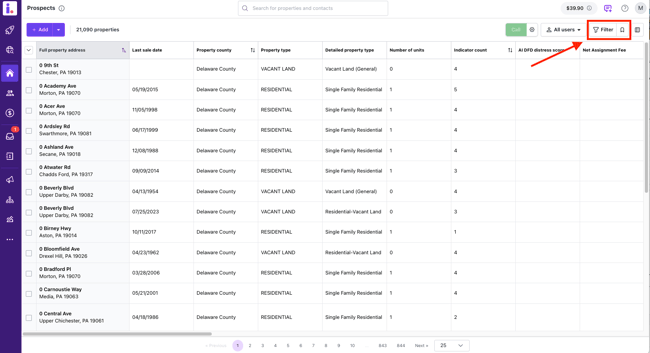
-
Click the Select Dropdown:
Once you have your filtered results, click the selection dropdown at the top of the table.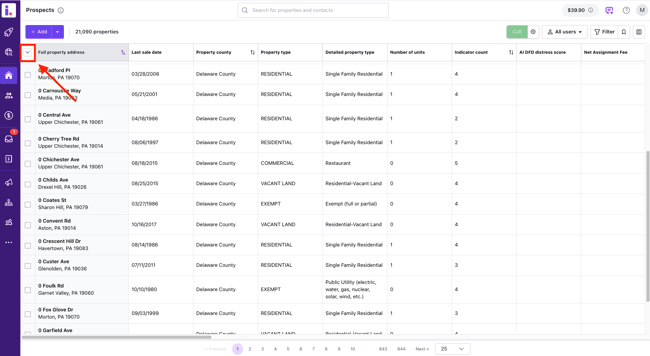
-
Choose the Number of Records:
You will now see an option allowing you to select a specific number of records. Simply input the number you want. For example, if your filter returns 8,000 records but you only want to pull 500 records, you can now do that directly. The first 500 records on the list will be the selected ones.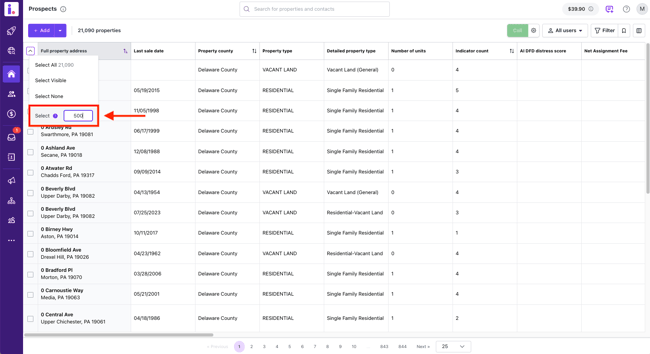
-
Review Before Confirming:
Invelo will display how many records you are about to affect. This ensures you always have clear visibility before proceeding with a bulk update.
Why this matters
This feature gives you more flexibility and precision when managing your data. It’s especially helpful when:
-
You want to enroll only a portion of your filtered results into a sequence
-
You're managing quotas or credits and need to process records in batches
-
You’re testing a campaign with a smaller subset before full rollout
With this improvement, you can now manage records more strategically—saving time, credits, and maintaining full control over your workflows.
If you have additional questions or need help using this feature, our support team is always here to assist!