![Invelo square logo-1.png]](https://helpdesk.inveloapp.com/hs-fs/hubfs/Invelo%20square%20logo-1.png?height=40&name=Invelo%20square%20logo-1.png)
The Associated Properties feature in Invelo helps you discover other properties owned by the same individual or entity. By identifying properties tied to the same owner’s mailing address, you can uncover additional opportunities, expand your lead lists, and gain better insight into an owner’s portfolio. This feature is available directly within the property record view and allows you to review, filter, and import associated properties into your workspace.
What are Associated Properties?
Associated Properties are properties connected through the same owner mailing address. When multiple properties share the same mailing address for the owner, Invelo groups them together so you can easily identify potential portfolio owners.
This is especially helpful for investors who want to:
-
Identify multi-property owners
-
Find additional off-market opportunities
-
Expand outreach to owners with larger portfolios
-
Quickly import related properties into their lists
Where to find Associated Properties
You can access Associated Properties directly within a property record.
-
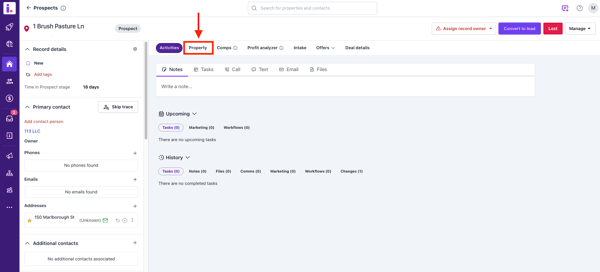
Open a single property record in Invelo.
-
Click the Property tab.
-
Select Associated Properties.
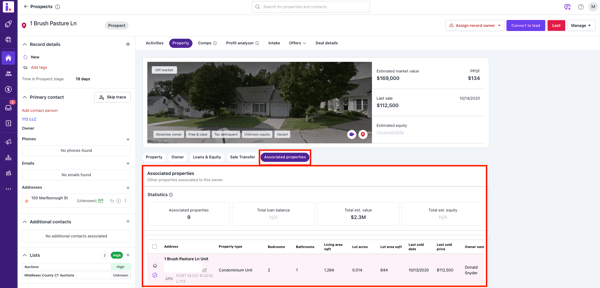
From this section, you’ll see a list of other properties connected to the same owner based on their mailing address.
What you’ll see in the Associated Properties section
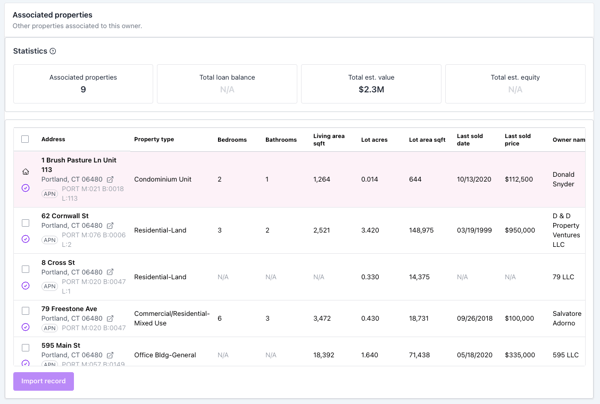
Within the Associated Properties tab, Invelo displays helpful information about the owner’s additional properties, including:
-
Owner portfolio statistics showing how many properties are associated with the same mailing address
-
A list of associated properties connected to that owner
-
The ability to review additional opportunities tied to the same owner
This gives you a quick overview of whether the owner controls a larger portfolio.
Import associated properties
If you discover additional properties you want to work, you can import them directly.
From the Associated Properties section, you can:
-
Import associated properties into your account
-
Add them alongside the currently viewed property
-
Include them in your lead lists or marketing campaigns
This makes it easy to expand your lead pool without starting a new search.
Filter using Associated Properties
Invelo also allows you to filter property records using the Associated Properties filter.
This filter lets you:
-
Identify properties whose owners have multiple properties tied to the same mailing address
-
Segment leads based on portfolio ownership
-
Focus on owners with multiple potential deals
Additionally, associated property data can be displayed within the property record view, allowing you to quickly see related properties while reviewing a lead.
Why this feature matters
Owners with multiple properties are often strong opportunities for investors. The Associated Properties feature helps you quickly identify and analyze these opportunities so you can prioritize outreach and potentially secure multiple deals from the same owner.
By leveraging Associated Properties in Invelo, you can uncover more opportunities from a single lead and build a stronger pipeline of potential deals.