![Invelo square logo-1.png]](https://helpdesk.inveloapp.com/hs-fs/hubfs/Invelo%20square%20logo-1.png?height=40&name=Invelo%20square%20logo-1.png)
When you’re prospecting for motivated sellers, equity is everything. One of the most powerful ways to measure equity and financial leverage is through Loan-to-Value (LTV) data.
In Invelo, LTV-related filters allow you to pinpoint property owners based on how much they owe compared to what their property is worth. Whether you’re targeting high-equity deals, distressed owners, or recently refinanced properties, these filters give you precise control over your list building.
Let’s break down what LTV means, why it matters, and how to use each loan filter effectively.
What is Loan-to-Value (LTV)?
Loan-to-Value (LTV) is the percentage of a property's value that is financed through loans.
Formula:
LTV = (Total Loan Balance ÷ Property Value) × 100
For example:
-
Property Value: $300,000
-
Loan Balance: $150,000
-
LTV = 50%
That means the owner has 50% equity in the property.
Why LTV is important for investors
LTV tells you:
-
How much equity a seller has
-
Whether there’s room for negotiation
-
If the property may qualify for creative financing
-
If the owner may be financially distressed
-
Whether the property is likely upside-down
Lower LTV = More Equity = More Deal Flexibility
Higher LTV = Less Equity = Higher Financial Pressure
Where to find Loan-to-Value filters in List Builder
You can access LTV and loan-related filters directly inside List Builder:
-
Go to List Builder
-
Click Filters on the right side of the quick filter menu to open advanced filters
-
Scroll down to the Loan Information filter group
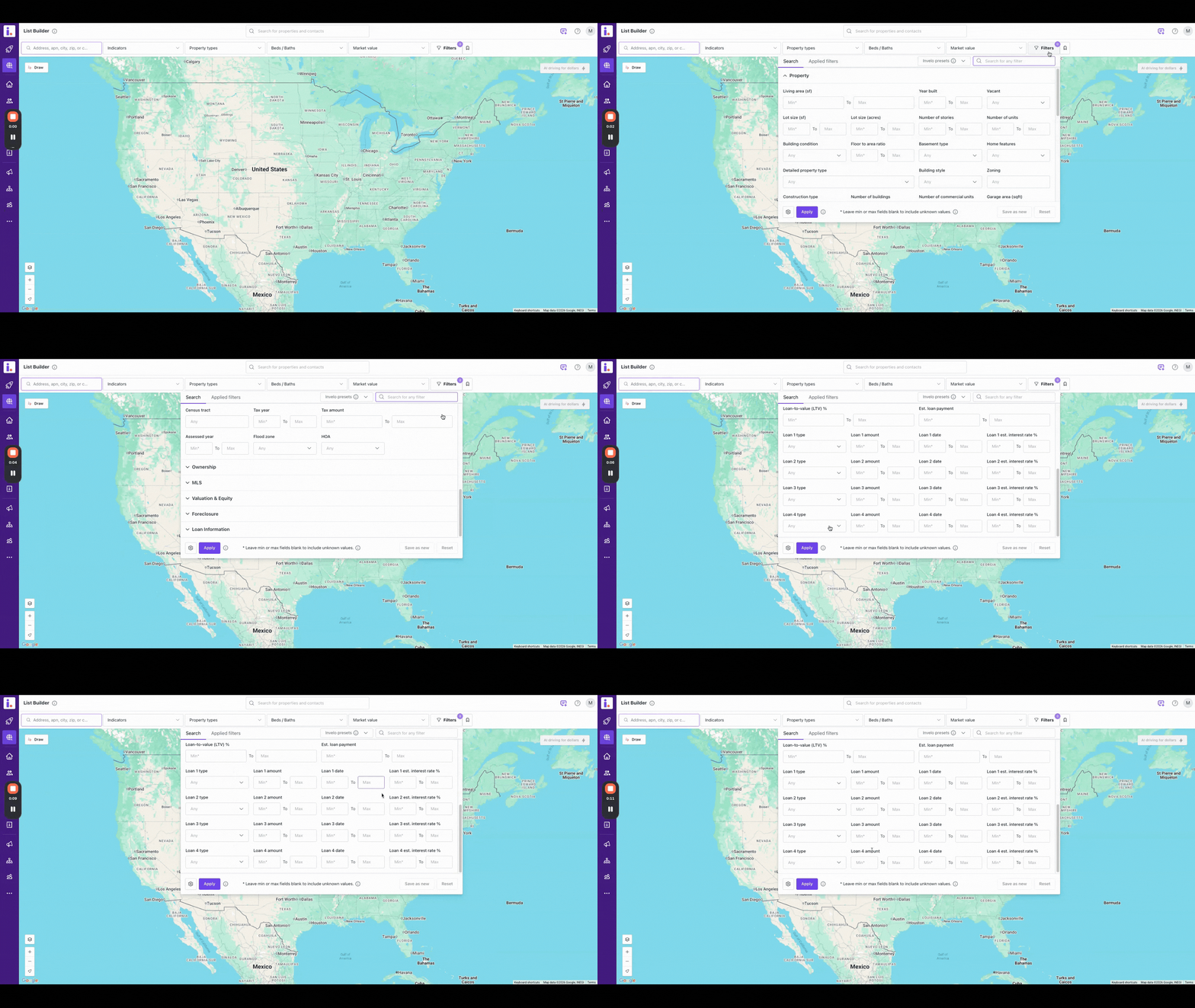
Inside this section, you’ll find all loan-related filters, including LTV %.
Where to find Loan & Equity details on a property
Once you generate results in List Builder, you can review detailed loan data for any property:
-
Select the property record you'd like to check
-
Click the Loans & Equity tab
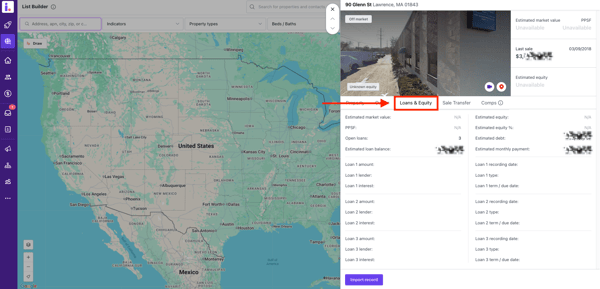
Here, you’ll see the recorded loan details and estimated equity information for that specific property address.
Invelo Loan & LTV filters explained
Below is a breakdown of each available loan-related filter and how to strategically use them.
1. Number of Open Loans
What it does:
Filters properties by how many active mortgages or liens are recorded.
When to use it:
-
Target single-loan properties for simpler closings
-
Find highly leveraged properties with multiple loans
-
Identify potential cash-out refinance situations
2. Estimated Open Loan Balance
What it does:
Filters by the total remaining balance owed on all open loans.
When to use it:
-
Target high equity owners (low balances)
-
Avoid properties with minimal profit margin
-
Find owners with large outstanding debt
3. Loan-to-Value (LTV) %
What it does:
Filters by the percentage of the property's value that is financed.
Strategic Use Cases:
| LTV Range | What It Means | Best Strategy |
|---|---|---|
| 0–40% | High equity | Cash offers, wholesale |
| 40–70% | Moderate equity | Negotiation flexibility |
| 70–90% | Low equity | Creative financing |
| 90%+ | Little to no equity | Subject-to, short sale |
Pro Tip: Combine LTV with ownership length for stronger motivation signals.
4. Estimated Loan Payment
What it does:
Filters based on the estimated monthly mortgage payment.
When to use it:
-
Identify owners with higher monthly financial burden
-
Target potential distress situations
-
Pair with high LTV for motivated seller campaigns
5. Loan Type (Multi-Select)
Examples may include:
-
Conventional
-
FHA
-
VA
-
Adjustable-rate
-
Commercial
Why it matters:
Different loan types may influence seller flexibility and risk tolerance.
Use cases:
-
Target FHA/VA owners with low down payments (typically higher LTV)
-
Find commercial-backed properties
-
Identify adjustable-rate mortgages that may reset soon
6. Loan Amount
What it does:
Filters based on the original loan amount.
When to use it:
-
Identify high-value financed properties
-
Spot large refinance transactions
-
Filter out low-value deals
7. Loan Date (Date Range)
What it does:
Filters properties based on when a specific loan was recorded.
When to use it:
-
Target recent refinances
-
Find older loans with likely high equity
-
Identify owners nearing the end of loan terms
Example:
Owners with loans recorded 15+ years ago may have substantial equity built up.
8. Estimated Interest Rate
What it does:
Filters based on the estimated interest rate of the loan.
When to use it:
-
Target adjustable-rate borrowers
-
Identify owners locked into high rates
-
Spot refinance candidates
Investor Insight:
Owners with high interest rates may be more open to creative solutions or selling.
How to combine LTV filters for stronger targeting
The real power comes from layering filters together.
Example Campaigns:
High equity motivated Sellers
-
LTV: 0–50%
-
Loan Date: 10+ years old
-
1 open loan
Distressed/high pressure owners
-
LTV: 80%+
-
High estimated payment
-
2+ open loans
Creative financing opportunities
-
LTV: 85%+
-
FHA or VA loan type
-
Low interest rate
When should you use LTV filters?
Use LTV filters when you want to:
-
Build highly targeted equity lists
-
Avoid low-profit properties
-
Create creative financing campaigns
-
Identify refinance activity
-
Narrow down serious seller prospects
If your strategy depends on understanding leverage and equity position, LTV filters should always be part of your list-building process.
Loan-to-Value data transforms your list from broad to strategic. Instead of marketing to every property owner, you can focus only on those with the financial profile that fits your investment strategy.
By combining LTV, loan balances, payment estimates, and loan types, you gain a deeper understanding of seller motivation — and ultimately, more profitable opportunities.
If you’re unsure how to layer these filters for your specific strategy, our support team is happy to help you build the right list.