![Invelo square logo-1.png]](https://helpdesk.inveloapp.com/hs-fs/hubfs/Invelo%20square%20logo-1.png?height=40&name=Invelo%20square%20logo-1.png)
The “Send to Webhooks” action allows you to seamlessly pass marketing audience data—such as property addresses and contact information—from your campaigns to other platforms. This is especially useful for automating workflows, syncing data across tools, or triggering actions in third-party systems. With just a few steps, you can integrate your marketing campaigns with the rest of your tech stack.
What is “Send to Webhooks”?
The “Send to Webhooks” action is a step you can add to your marketing campaign sequences. When triggered, it sends selected data from your campaign (e.g., property and contact records) to a specified webhook URL in real time.
How to Set It Up
-
Create a Marketing Campaign
Start by creating a new marketing campaign in Invelo. (Create a new campaign) -
Add a Sequence
Inside your campaign, click “Add Sequence.”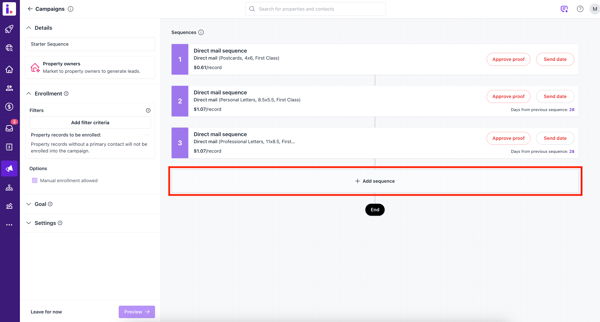
-
Select “Send to Webhooks”
Choose the “Send to Webhooks” action from the list of available actions.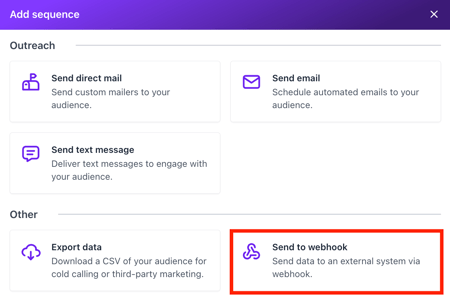
-
Configure the Webhook
-
Enter the Webhook URL where the data will be sent
-
Select the appropriate HTTP Method (e.g., POST, GET)
-
Choose the Content Type (e.g., JSON, form-data)
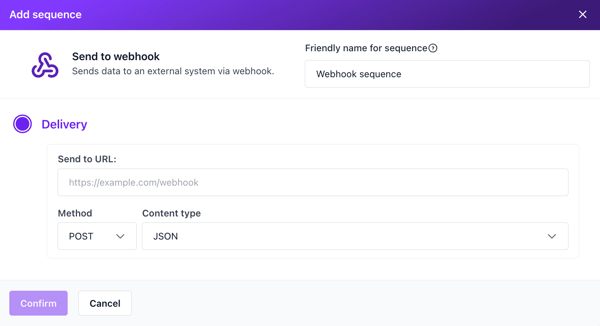
-
-
Complete Campaign Setup
Finish building your campaign by configuring the rest of your sequences, audience, and settings as needed.
Common Use Cases
Here are some practical ways to use the “Send to Webhooks” action:
-
CRM Syncing
Automatically send new leads or campaign contacts to an external CRM. -
Lead Management Automation
Trigger workflows in other platforms (e.g., assigning leads, updating pipelines). -
Third-Party Marketing Tools
Pass campaign data to tools for SMS, email, or retargeting campaigns. -
Custom Notifications
Send data to apps like Slack or Discord to notify your team when leads enter a campaign. -
Data Warehousing & Reporting
Push campaign data into analytics platforms or databases for deeper reporting. -
Zapier / Make Integrations
Use webhook-compatible automation tools to connect Invelo with thousands of other apps.
Tips & Best Practices
-
Ensure your webhook URL is active and properly configured to receive data
-
Double-check the selected method and content type to match your receiving system
-
Test your webhook with a small audience before launching at scale
-
Coordinate with your developer or integration tool to confirm payload structure
By leveraging the “Send to Webhooks” action, you can extend the power of your marketing campaigns beyond Invelo and create a more connected, automated workflow across your tools.
In case you need any support, feel free to send our Support team a message through the in-app chat or email at support@inveloapp.com.