![Invelo square logo-1.png]](https://helpdesk.inveloapp.com/hs-fs/hubfs/Invelo%20square%20logo-1.png?height=40&name=Invelo%20square%20logo-1.png)
While Invelo allows you to automate marketing to large lists, there may be times when you want to manually enroll a single property or contact into a specific campaign. This is useful for testing, re-engaging a lead, or customizing outreach on a case-by-case basis.
✅ Steps to Manually Enroll a Record:
-
Go to the single property or contact record view in your account.
-
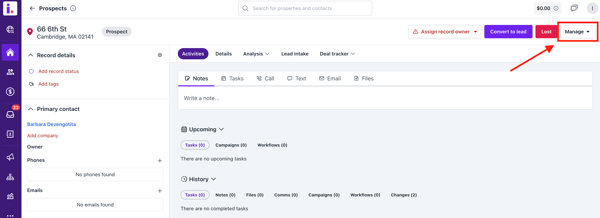
Click on the Manage button in the top-right corner.
-
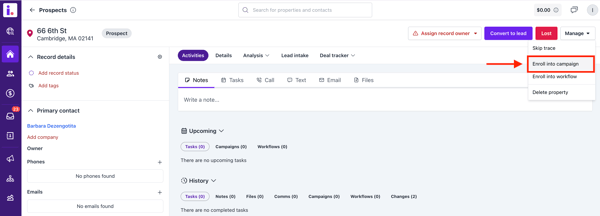
Select Enroll into Campaign from the dropdown menu.
-
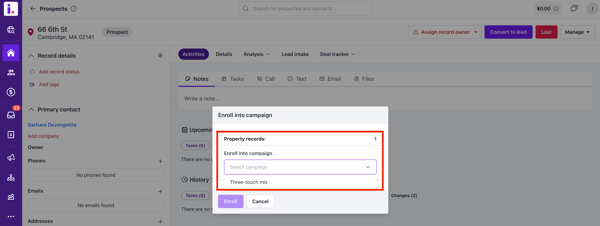
Choose the campaign you'd like to enroll the record into.
-
Confirm your selection by clicking Enroll—and you're all set!
Manually enrolling records gives you greater control over your outreach strategy. If you have any questions or run into issues, don’t hesitate to reach out to our support team via the in-app chat or email at support@inveloapp.com for assistance.