![Invelo square logo-1.png]](https://helpdesk.inveloapp.com/hs-fs/hubfs/Invelo%20square%20logo-1.png?height=40&name=Invelo%20square%20logo-1.png)
View your account usage for quota-based features, including free monthly skip traces, property records, users, custom fields, workflows, file storage, and monthly exports.
Viewing your account usage
You can view your account usage for quota-based features by following these instructions:
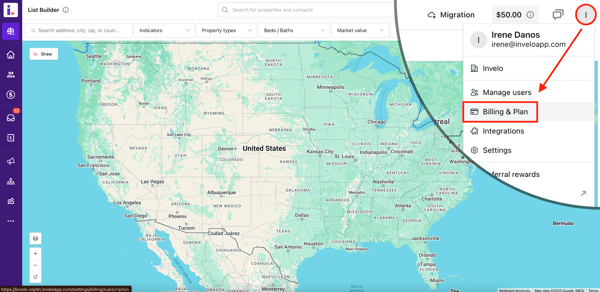
- Click your profile icon in the top-right corner and select Billing & Plan from the dropdown menu.
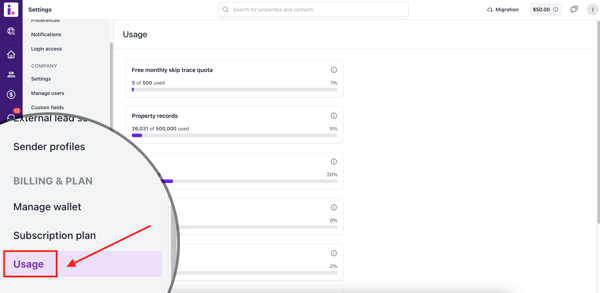
- On the Settings page, navigate to the Usage section under Billing & Plan.
- In the Usage page, you’ll find a detailed breakdown of your account's usage for quota-based features, including:
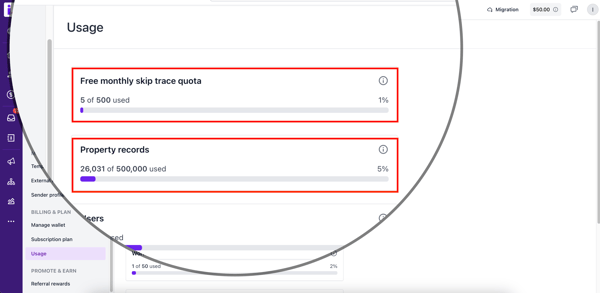
- Free monthly skip traces
- Property records
- Users
- Custom fields
- Workflows
- File storage
- Monthly exports