![Invelo square logo-1.png]](https://helpdesk.inveloapp.com/hs-fs/hubfs/Invelo%20square%20logo-1.png?height=40&name=Invelo%20square%20logo-1.png)
Having sufficient funds in your Invelo wallet will enable you to run marketing campaigns, order skip tracing, or purchase add-ons.
Managing your Invelo wallet
-
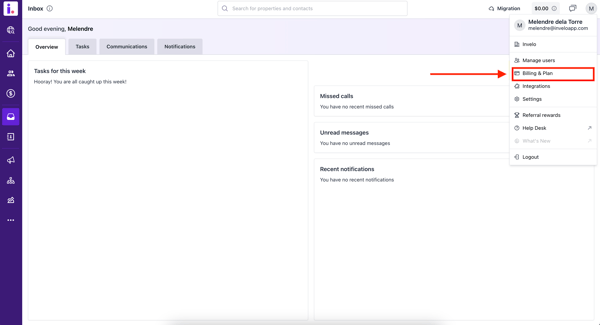
Click your profile icon in the top right and select Billing & Plan.
-
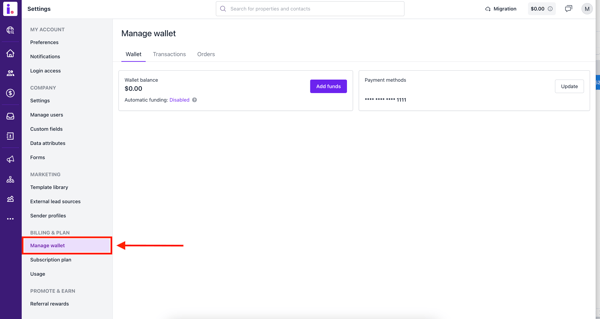
Under Billing & Plan, select Manage wallet.
-
From here, you can see your wallet balance, payment methods, and transaction history.
Add wallet funds
There are two ways to add funds to your wallet:
-
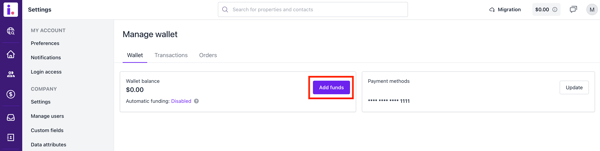
Under Billing & Plan, click Manage wallet (as shown above), and select Add Funds.
-
Click your wallet balance in the top right part of the page.
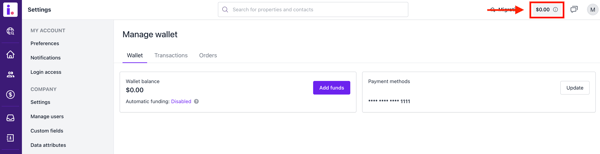


Then complete the following steps:
- Click one of the predetermined amounts, or manually enter an amount (a minimum of $50 is required).
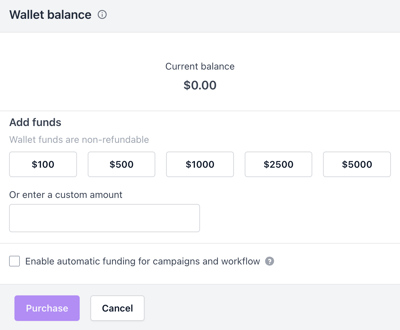
- (Optional) Click the Enable automatic funding for campaigns and workflow checkbox to automatically add funds to your Invelo wallet in the event that you do not have enough to cover your marketing campaign batches.
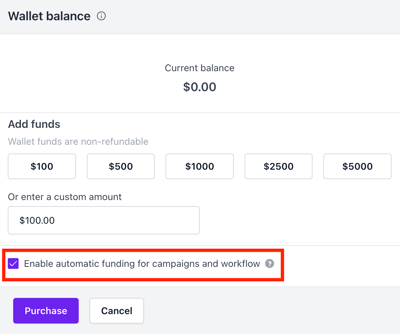
- Click Purchase.

If you plan to run marketing campaigns, ensure that you enable Automatic Funding. The Automatic Funding feature will ensure that your marketing campaigns don't get disrupted by insufficient funds.